Your Vault is Getting Full — So We Added Search
As your draft history grows across dozens of sites, scrolling just doesn't cut it. Here's what's new in v0.2.2.
There’s a version of Form Recover that works exactly as it’s supposed to: quietly, invisibly, accumulating drafts in the background so that when disaster strikes, you’re covered.
The problem? It works too well.
After a few weeks of active use, your vault fills up. GitHub issues, Reddit comments, support tickets, long-form emails. And suddenly, finding the one draft you actually need becomes a chore of its own.
That’s the problem v0.2.2 solves.
All Vault — Now With Search
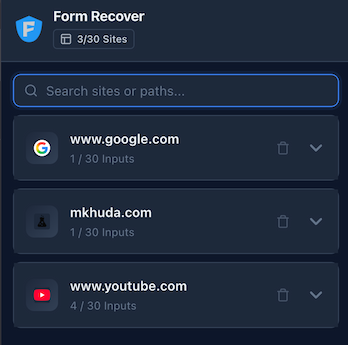
The All Vault tab gives you a bird’s-eye view of every site Form Recover has ever touched. Originally, it was organized by domain with an accordion-style layout — clean and simple.
But simple stops working when you’re protecting 20+ sites.
In v0.2.2, we added a search bar directly in the All Vault tab. Type any part of a site name or URL path and the list filters in real-time. Looking for that Notion alternative you were writing on last Tuesday? Type notion and it’s there.
No scrolling. No squinting.
Current Site — Quick Search
The second improvement is subtler but just as useful.
If you only have 1 or 2 drafts on the current site, a search bar would just be noise. So we only show it when you need it: once a site has more than 3 saved entries, a quick search bar appears automatically at the top of the current site’s draft list.
This is especially useful for platforms you live on — GitHub, Jira, Reddit — where Form Recover might have captured dozens of drafts across different threads, issues, or comment sections.
Why This Matters
Recovery tools are only useful if you can actually find what you lost.
Up until now, restoring a draft was a two-step process: re-open the tab, click the ghost icon. Simple. But when that doesn’t work — when the draft was from a different URL, or you just need to copy-paste a chunk from three sessions ago — you had to dig manually.
Search makes that second step disappear.
What’s Next
We’re continuing to work on the vault experience. A few things on our radar:
- Export: Save your history as a JSON or plain-text backup
- Pinning: Mark specific drafts so they always show up first
- Search by content: Not just by site, but by what you actually typed
As always, everything stays local. No cloud. No accounts. No compromise.
If you’re already using Form Recover, the update is automatic. If you’re not, here’s your chance: