Someone Asked What "19/30" Meant — We Didn't Like Our Own Answer
Form Recover used to stop saving once 30 sites had drafts. In v0.3.0 the vault rolls instead of refusing, you can pin up to 10 sites, and the counter that caused the confusion is gone.
A while ago someone wrote in with a question that looked simple:
What does Active Sites (##/30) mean? And if I reach 30, will it stop saving?
Two questions. The first one was easy. The second one was the problem — because the honest answer was yes.
Once Form Recover had drafts saved on 30 different sites, the 31st site was refused. You could open a form there, type a long reply, and nothing was kept. An extension whose entire job is not losing your work was quietly deciding not to do its job.
Nobody had complained about that, because nobody could see it happening. That is the worst kind of bug: the one that looks like nothing at all.
v0.3.0 is the answer we wished we could have given.
Your newest site is always protected
Form Recover no longer refuses anything. When the vault is full, the site you have not visited in the longest time makes room for the one you are typing on right now.
The site you are on is the one you are about to lose work on. It should never be the one we turn away.
Being straight about the trade
That older site’s drafts really are removed. We are not going to describe this as “archiving” or “optimising” — something is let go, and you should know which direction it goes.
For almost everything, that is the right trade. Last month’s Reddit comment matters less than the form open in front of you.
But not always.
Some forms are opened once a year
The most painful forms to lose are the ones you barely visit: a tax portal, a visa application, a scholarship form, an insurance claim. You touch them once, you write for forty minutes, and you do not come back for eleven months.
“Least recently visited” is exactly the wrong signal for those. By that measure, the most expensive thing in your vault looks like the most disposable.
So you can pin them. Open the All Vault tab, star up to 10 sites, and they are never replaced — however long you leave them alone.
Ten, not unlimited, on purpose. A pin is only meaningful if it is scarce; if everything is pinned, nothing is protected.
The number itself was the problem
Here is the part that took longest to admit.
The counter said 19/30. Technically accurate. But 19/30 is the shape of a fuel gauge, a quota, a trial running out — and people read it that way. That is why we got the question at all.
If a number needs explaining, the number was the problem.
So the header stopped counting against you, and started saying what it is doing:
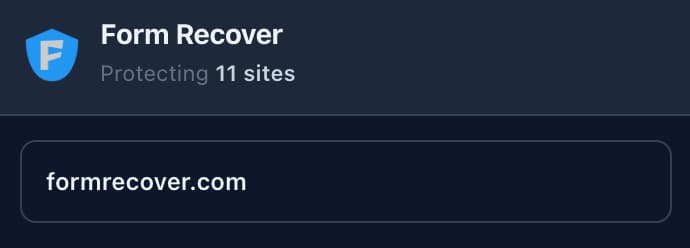
Same information. No arithmetic. Nothing to interpret.
And when the vault is full, it says “Keeping your 30 most recent sites” — which is a description of how it works, not a warning that something is wrong.
Nothing is wrong when it is full
The storage meter and the draft-history badge used to turn red or amber as they filled. We removed that.
A warning that is permanently lit is not a warning, it is decoration — and worse, it teaches you to ignore the colour for the day something genuinely needs your attention. A full vault is Form Recover working exactly as designed. It should look calm, because it is calm.
The recovery icon also shows its tooltip straight away now, instead of waiting until your next save.
What has not changed
Form Recover still keeps drafts for 30 sites, 30 inputs per site, and 5 versions of each. Those numbers keep the vault fast and small on your own disk — they are not a lever we are holding back.
And everything still stays on your device. Encrypted, local, no account, no cloud, nothing sent anywhere.
Thank you for asking
This release exists because one person took the time to ask what a number meant instead of shrugging and moving on. We had looked at that counter for months without seeing it.
If something in Form Recover confuses you, it is worth telling us. The confusing part is usually our mistake, not yours.
If you already have it installed, the update is automatic. If you do not: